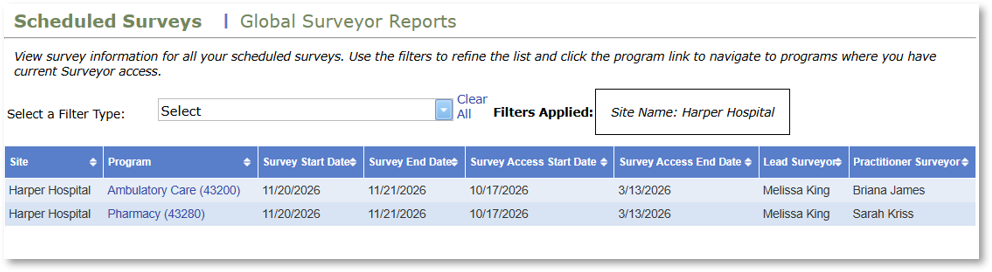
The Scheduled Surveys page allows surveyors to view detailed information about their scheduled surveys and access programs where they have active surveyor access. The page is located on the My Surveys tab.
The My Surveys tab is always available to ASHP Lead Surveyors. Practitioner Surveyors can access the tab when they are scheduled for a survey and the survey is within the designated access dates.
Before You Begin: Understanding Functionality on the Scheduled Surveys Tab
- Filters allow surveyors to refine and narrow the list of scheduled surveys.
- The grid displays survey information, including site, program, survey start date, survey end date, survey access start date, lead surveyor, and practitioner surveyor.
- Links are available to navigate to programs where the surveyor has active surveyor access.
Instructions
- Log in to PharmAcademic and navigate to the My Survey tab on the Home page.
- Select Scheduled Surveys.
- Filter your schedule.
- On the Filter Type drop-down menu, select how you want to filter your schedule. Options include: Survey Start Date, Survey Access Start Date, Accreditation Code, or Site Name.
- Enter the appropriate filtering criteria, such as the accreditation code.
- Click Apply Filter to update the results.
- Review information about the scheduled surveys.
- Click the program link to navigate to programs for which you currently have Surveyor access.